
Presentation from WITEA 2026
https://docs.google.com/presentation/d/1gXhzIIa_fUGLE9GYaALe6dy8rapRYmEr_p5olBioads/edit?usp=sharing
The Neuron Newsletter
The Enterprise AI Platform War Has a Scoreboard Now. Anthropic Is Winning. – from 3-12-2026
- Start the audio at the 6:15 minute mark
Remote for Slides (Google Slides Remote Presenter Control for a Phone)
https://chromewebstore.google.com/detail/remote-for-slides/pojijacppbhikhkmegdoechbfiiibppi?pli=1
Storytelling Matters!
Scott’s presentation guru, Garr Reynolds, stated it best at his site, presentationzen.com: “We are a storytelling animal. We are not a bullet-point-memorizing animal. We are wired to be attracted to story and to learn from them and to spread them.” “The best stories infuse wonder,” says Pixar’s Andrew Stanton. Come learn how to tell better stories, engage and not enrage your students. (New and improved distance learning edition!)

Know this… PowerPoint is Evil!
Imagine a widely used and expensive prescription drug that promised to make us beautiful but didn’t. Instead the drug had frequent, serious side effects: It induced stupidity, turned everyone into bores, wasted time, and degraded the quality and credibility of communication. These side effects would rightly lead to a worldwide product recall.
Taken from WIRED; PowerPoint Is Evil. Power Corrupts. PowerPoint Corrupts Absolutely. By Edward Tufte
Contribute to the Pre-session and TPEP Survey

- Take the Presentation / Session TPEP Prioritization Agenda Survey
- This is a standards-based presentation/session
- Gathering data from students/teachers can help you prioritize the most engaging content
- Scott placed the TPEP standards, which are based on the Danielson Model, in a Google Form
- What would you like to learn from this session?
- What domains and components (Standards) would you like highlighted through this session?
- Data gathering is essential for tracking growth, helping Scott differentiate the experience to your needs
Review Participant Data To Set Session Goals
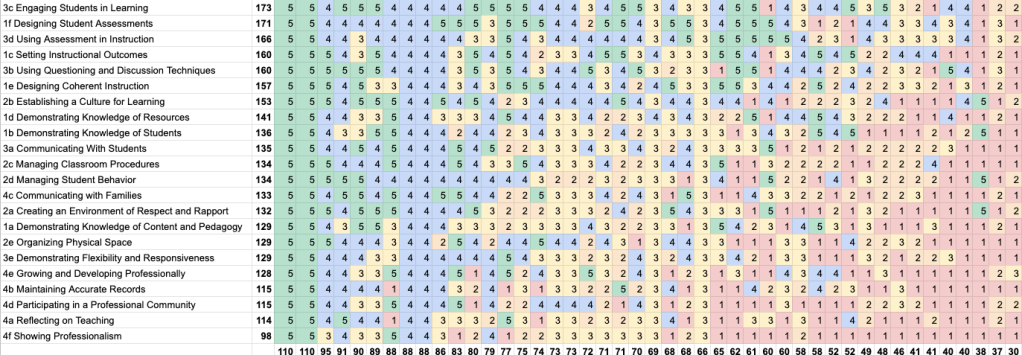
- Review the spreadsheet of data (Link is only for Scott to use live)
- Watch Scott’s Session Goal Setting with Data YouTube Tutorial
Top TPEP Requested Component…
- #1 is… 3c Engaging Student Learners (Danielson description PDF), example student behaviors below:
- Students take the initiative to improve the lesson by (1) modifying a learning task to make it more meaningful or relevant to their needs, (2) suggesting modifications to the grouping patterns used, and/or (3) suggesting modifications or additions to the materials being used.
- Students have an opportunity for reflection and closure on the lesson to consolidate their understanding.
- Students are asked to write an essay in the style of Hemmingway and to describe which aspects of his style they have incorporated.
- Students determine which of several tools—e.g., a protractor, spreadsheet, or graphing calculator—would be most suitable to solve a math problem.
- A student asks whether they might remain in their small groups to complete another section of the activity, rather than work independently.
- Students identify or create their own learning materials.
- Students summarize their learning from the lesson.
Play Bingo – sort of…
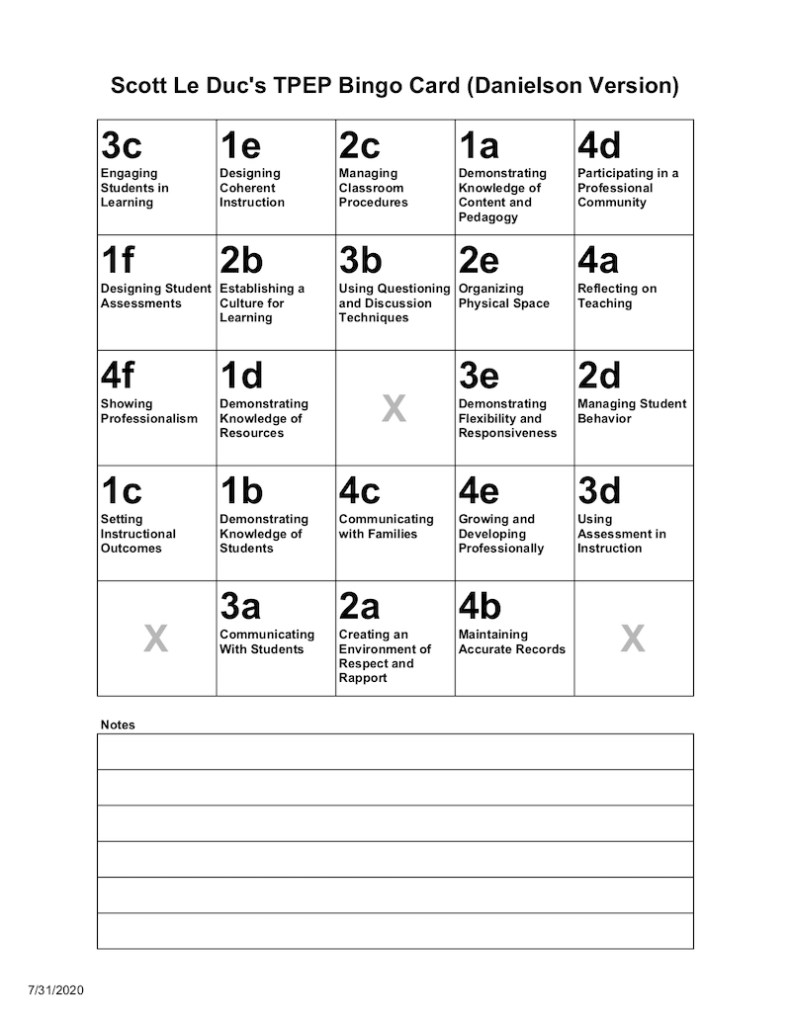
- SIMPLE TPEP Bingo Card – Danielson (above) (PDF)
- DETAILED TPEP Bingo Card – Danielson (has the State 8) (PDF)
- Playing bingo with standards is a great way to activate the gaming mentality in students/teachers – get them looking, searching in your curriculum – doing is learning!
Endure Scott Le Duc’s Introduction

- Decide whether he is credible or not
- Started teaching CTE Arts and Technology in 1996 at Capital High School in Olympia, WA
- Achieved and maintained National Board Certification in CTE (since 2014)
- Selected as one of the top presenters at numerous CTE conferences
- He stuffed the ballot box! – shhh…
- Can moonwalk and touch his tongue to his nose
Contemplate Scott’s Presentation Goal
Designed with Andragogy for the ADULT Mind
- Need to know: Adults need to know the reason for learning something.
- Foundation: Experience (including error) provides the basis for learning activities.
- Self-concept: Adults need to be responsible for their decisions on education; involvement in the planning and evaluation of their instruction.
- Readiness: Adults are most interested in learning subjects having immediate relevance to their work and/or personal lives.
- Orientation: Adult learning is problem-centered rather than content-oriented.
- Motivation: Adults respond better to internal versus external motivators.
Remember, Andragogy can be for Young ADULT Mind’s, too!

Infused with Bloom’s Taxonomy Verbs

- For a more detailed description of Bloom’s Taxonomy examine the Model Questions and Key Words PDF
- Examine 126 Bloom’s Taxonomy Verbs For Digital Learning
- Scott’s Rubric Builder (help Students Build Rubrics with Bloom’s Verbs)
- REDO – No evidence of standard
- LIST the stages and procedures used in the recording process. APPROACHING STANDARD
- DESCRIBE the stages and procedures used in the recording process. MEETS STANDARD
- DEMONSTRATE the stages and procedures used in the recording process. EXCEEDS STANDARD
Example of a Bloom verbs-based rubric where the ‘standard verb’ was ‘describe’ with the lower level verb was ‘list’ and higher level verb was ‘demonstrate’
Contemplate That The Brain Can Only Absorb What The Butt Can Endure

Contact Scott for Information, Resources, and Training
- sleduc@osd.wednet.edu (Olympia School District)
- scottleduc@gmail.com (Personal)
- Scott’s presentation social bookmarks at Diigo.com
- Scott’s Capital High School site
- Scott’s Capital High School Blog – CapitalComTech.info (Curriculum)
Get On With It!
Why?
- Consider these three things students and teachers need for the world of work:
- Show, don’t tell (it’s put up or shut up)
- Need to communicate effectively and in various formats
- Need to stand out
Examine Science and Research
Why Storytelling Matters

- Examine Brain Science and Research
- Brain Rules by John Medina
- Made to Stick by the Heath Brothers
- 2 + 2 with Andrew Stanton
- Start from the 6:25 minute mark
What? (13 min.)
- Explore Presentation Styles and Resources (10 min.)
- Lawrence Lessig Free Culture Presentation (3 min.)
- Dick Hardt (3.5 min.)
How? – The Planning Stage (The Paper Part) (30 min.)

- The Preparation Stage
- Garr Reynolds DVD – Preparation Stage (7 min.)
- Video (Private)
- Brainstorm and Brainwrite Ideas (Right Brain) (10 min.)
- Explore Life Hack for Generating Ideas
- Use on paper
- Use FreeMind on computer
- Explore ideas to jump start idea generation
- “F” Words – Family, Food, Fun, Friends, Fondness, Fundamentals, Frequency, Foundation, Faith, etc.
- Want to hook into each audience member at least once

- Draft Paper Story Board (Left Brain) (10 min.)
- Create a paper draft layout or mock-up of the your slides
- Folder a piece of paper so there are 16 sections, use each one to draw a draft of the slide
- Write the actual words that will appear on each slide or write which picture will appear on the slide, example: PICT OF CAT
- The goal is to have hooks represented as images or text about you that will help you connect with your audience
- Story board resources
- Create a paper draft layout or mock-up of the your slides

- Pitch The Storyboard (10 min.)
- Use the paperwork and pitch the flow of the presentation to others
- This will act as practice for both the content and delivery
- 1 to 20 rule
- Every minute of presentation time requires 20 minutes of preparation time
- Use the paperwork and pitch the flow of the presentation to others
How? – The Building Stage (The Technology Part) (45 min.)
- Type a Slide List (Script) (5 min.)
- Microsoft Word
- Microsoft PowerPoint
- Google Slides
- Apple Keynote
- Create a PowerPoint Master Slide Template (5 min.)
- Create a slide master background
- Choose black
- Darks appear further away
- You own ‘the presentation wall’ – there is no border
- Choose font and font color(s) for the presentation
- Choose white
- Maximize contrast with the background
- Do not change colors during the presentation, unless you have a specific reason
- Change activates attention, do it deliberately
- Color in Motion (YouTube)
- Create a slide master background
- Place Text in Slide Outline (5 min.)
- Save to the class shared
- Discuss Copyright and Creative Commons (10 min.)
- Lawrence Lessig and Copyright (TED)
- Watch first 9 minutes
- Lawrence Lessig and Copyright (TED)
- Gather Images from Flickr.com (10 min.)
- Flickr and Creative Commons Searching through Search.CreativeCommons.org
- Be sure to cite sources
- MLA Formatting example
- Date download
- Website
- Author
- Title of image
- Flickr and Creative Commons Searching through Search.CreativeCommons.org
- Publish Slide show (10 min.)
- Upload to Slideshare.net
- Use VoiceThread.com to host a presentation and record audio, if you cannot present ‘live’
- Examine Scott’s VoiceThread resources from 10 years ago – kinda funny!
How? – The Presentation Stage (Stand and Deliver Part)
- Present Your Slideshow (45 min.)
- Watch How to Present with Power and Poise (30 min.)
- Watch 11 Things to Never Say in a Presentation (3 min.)
- Examine the 4 A’s of Being a Good Audience Member (2 min.)
- Discuss difference between practice and preparation by Stephen Tobolowsky (10 min.)
- Start at 13:00 to 23:30
- Use VoiceThread.com (to record narration with the slides)
- Use Screencastify to record your desktop
The “Do My Slides Suck” Test from Kathy Sierra
- Do your slides contain mostly bullet points?
- Do you have more than 12-15 words on a slide?
- Do your slides add little or no new info beyond what you can say in words?
- Are your slides, in fact, not memorable?
- Are your slides emotionally empty?
- Do your slides fail to encourage a deeper connection to or understanding of the topic?
- Do your slides distort the data? (That’s a whooooole different thing I’m not addressing now)
- Do your slides encourage cognitive weakness? (refer to Tufte)
Scott Le Duc’s Student Presentation Projects and Resources
Scott’s STUDENT INTRODUCTION PRESENTATION Project

- My Presentation Directions (including creating a blog post about the creation process)
Scott’s PRESENTATION SLAM Teams Resources
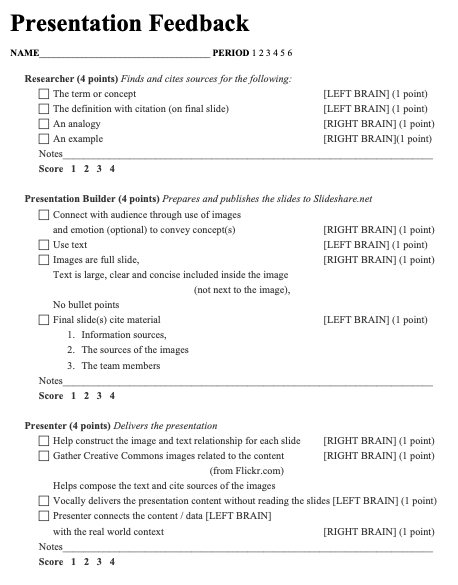
- Presentation Slam instructions
- We use the slam to develop presentations of terms and concepts to Thinking / Knowledge content
- Presentation Slam Feedback Form (PDF)
Team Practice, Preparation, and Presentation Feedback Forms
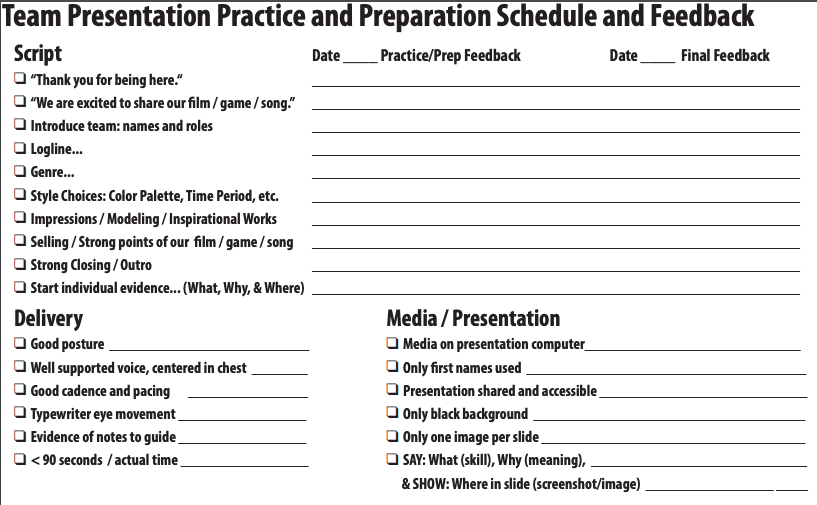
- Team Presentation Form 5 Film (PDF)
- Team Presentation Form 5 Game (PDF)
- Team Presentation Form 5 Rock (PDF)
Use Kahoot After Learning the Core Elements of Effective Presentation
- Want to know what students retained from your presentation?
- Use Kahoot.it to quiz them on the content
- This is great formative assessment and will inform your decisions on future content and process
- Have students make a Kahoot for their own presentations!
The Tools
- Paper (right brain – brainwrite and brainstorm)
- Folded paper (folded 4 times, to be specific) (left brain – storyboard)
- Microsoft PowerPoint
- Apple Keynote
- Open Office Impress
- Google Slides
- Voicethread
Learn From The Best
Some of the best presenters are Lawrence Lessig, Guy Kawasaki, Seth Godin, and Dick Hardt. Examine their approaches.
Example Presentations
- Lawrence Lessig Presentation on Free Culture
- Dick Hardt inspired by Lessig presented the OSCON 2005 Keynote – Identity 2.0.
- Seth Godin Presentation Example
- Guy Kawasaki 10 – 20 -30 Rule Presentation
Scott Le Duc’s Resources for Presentation
- RemNote
- Google NotebookLM
- Audible.com bookmarks
- Scott’s Diigo Social Bookmarks
- Scott’s Class Blog, capitalcomtech.info
- Scott’s Blog Post Templates are here, mrleduc.edublogs.org
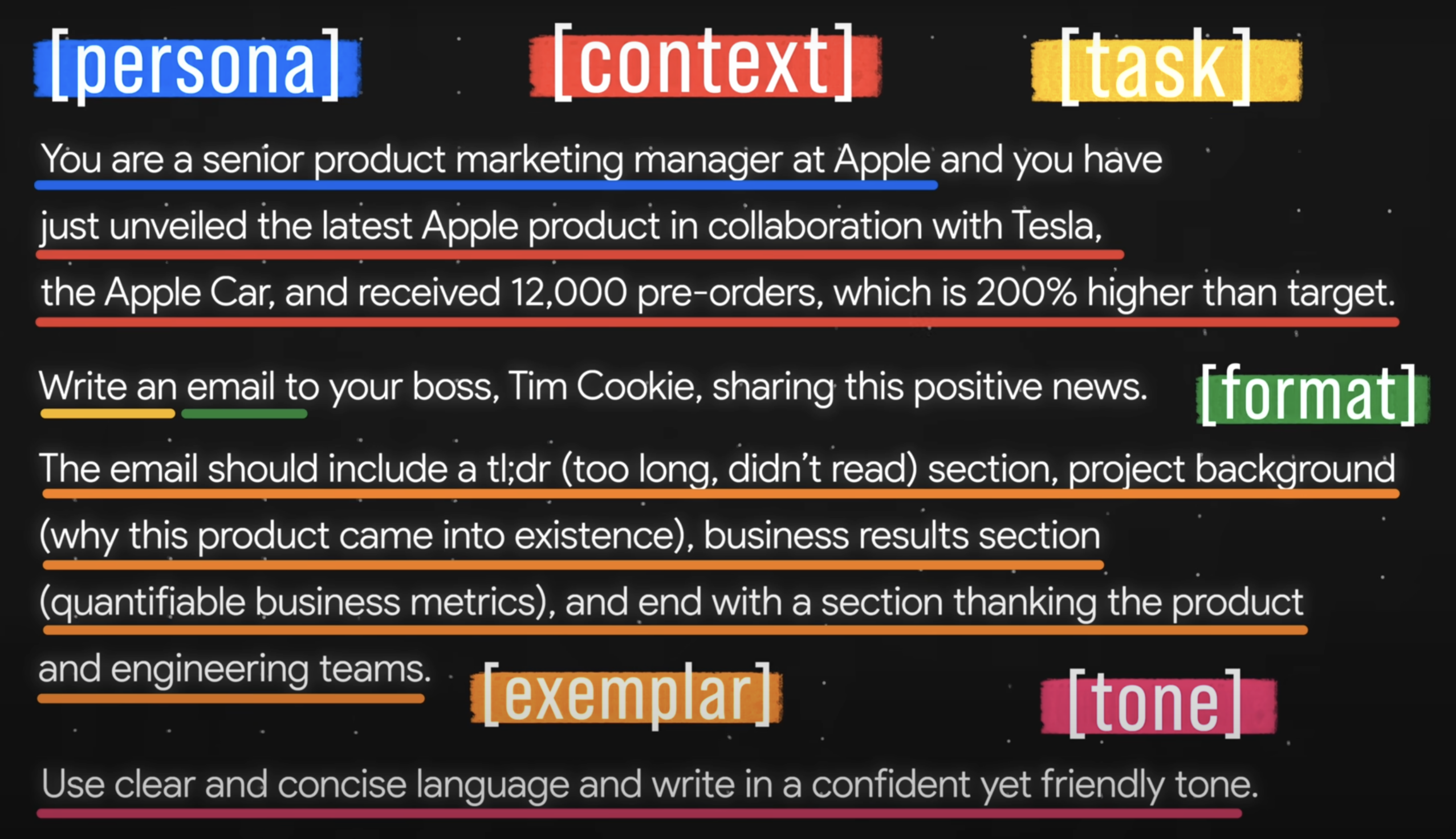
Jeff Su’s Master the Perfect ChatGPT Prompt Formula (in just 8 minutes)!
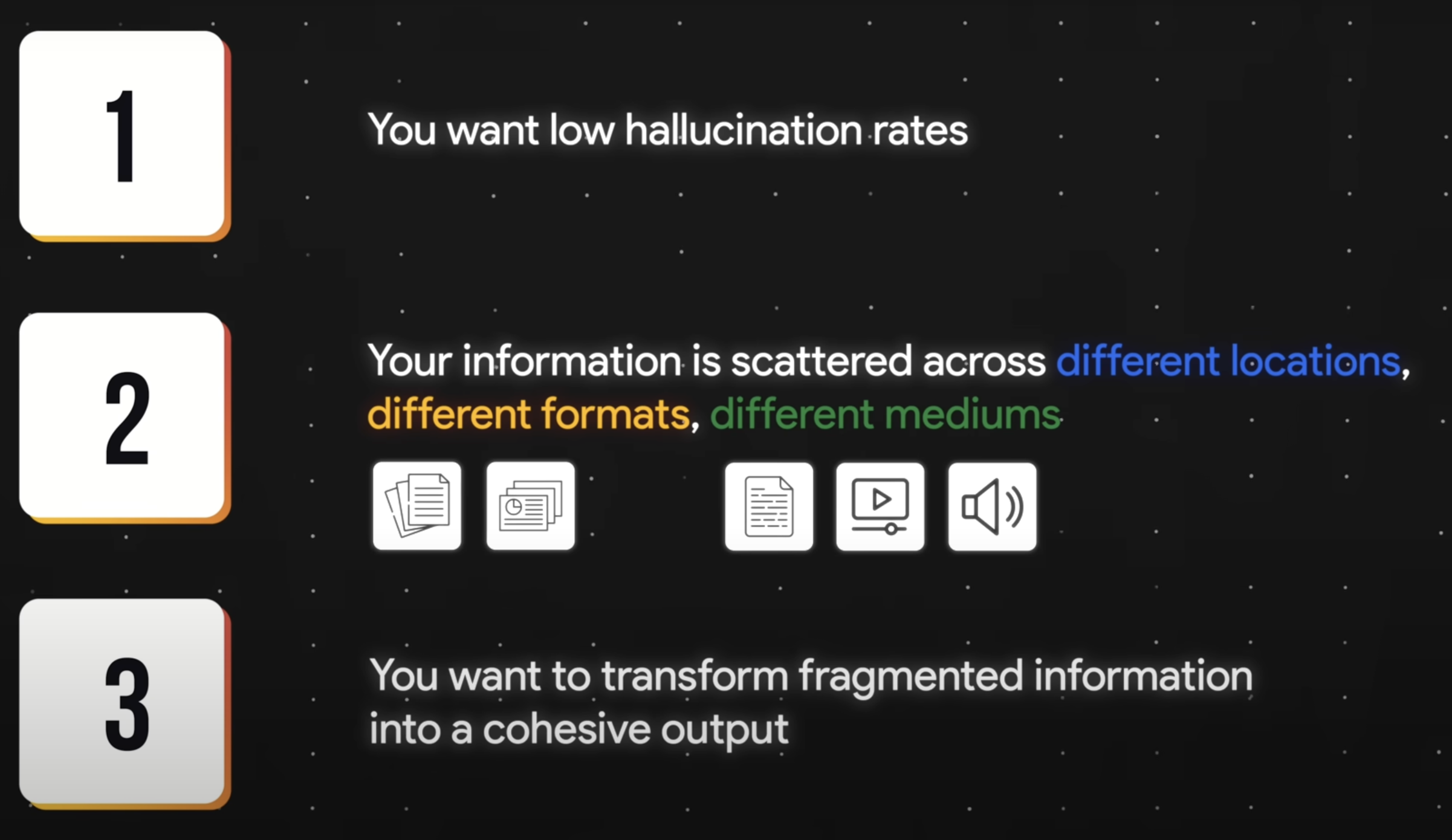
Jeff Su’s Learn 80% of NotebookLM in Under 13 Minutes!
Pre-Session Poll Results
PROMPT: You are a professional presenter and educator. You are presenting at a CTE conference and presenting how to create presentations that better connect with high school career and technical education students. The audience is career and tech teachers who want to communicate more effectively through presentations. Use the resources in this notebook to create a short bulleted list of material to answer the questions that are included below from the survey responses of conference session attendees. Here are the poll results…
Poll Results: 18 Answers
Budget updates
Increased student engagement
Prompt writing
District limitations on access to AI even for the AI classroom
Using various AI tools in the classroom when Microsoft Copilot is the only approved IT option.
The quickest ways to make presentations that are engaging and easily digestible for students.
using and identifying the use of AI in the classroom
The effective use of AI for students and teachers
I think the title addresses the concern… most AI created presentations are super boring!!
How to get automatic “check for understanding” on slides and throughout the slideshow.
Changes in industry standard and Ospi expectations
How much should we and students us AI?
Ways to incorporate the industries into the classrooms better.
Writing a grant and succeed on acquiring it for our students.
Practical skills to implement
Just a huge fan of the original session and looking forward to how AI is implemented 🙂
CTE plan 1 pathway
NotebookLM’s Results
Good morning, fellow educators! It’s great to be here at the CTE conference, focused on empowering our presentations to truly connect with high school career and technical education students. Your survey responses have given us a clear roadmap for what you want to learn, especially how to make presentations more engaging and effective for your students.
Here’s a bulleted list of material addressing your survey responses, drawing from the provided sources:
Making Presentations Engaging and Easily Digestible for Students (Combating “Boring AI-Created Presentations”)
The goal is to create presentations that “don’t suck” by ensuring they are engaging and easily digestible, which is key to countering the concern that “most AI created presentations are super boring!!” [1, Survey]. Remember, “We are a storytelling animal. We are not a bullet-point-memorizing animal. We are wired to be attracted to story and to learn from them and to spread them”.
• Embrace Storytelling:
◦ Storytelling matters! It engages students and “infuses wonder”1. Stories increase drama and help with engagement.
◦ Zoom into the moment: The best stories don’t just summarize events; they take listeners “into the trenches” and make them “part of that physical moment”.
◦ Incorporate Five Storytelling Techniques to create immersive narratives:
▪ Location: Start by stating where you are physically (e.g., “2 weeks ago I was sitting on my couch in my living room”). This helps the audience visualize the scene without needing excessive detail.
▪ Actions: Describe what you are doing in that specific moment to bring in “forward momentum”.
▪ Thoughts: Share your hopes, dreams, fears, or worries from crucial moments. Make these thoughts sound raw and unfiltered for relatability.
▪ Emotions: Show emotions through body language or facial expressions rather than just stating them (e.g., “in that moment I lean backward and let out this big sigh” instead of “I was relieved”).
▪ Dialogue: Use the exact words characters spoke in crucial moments to make the story more interesting and “juicy”.
• Audience-Centered Approach:
◦ Put the audience first. Your story, if approached correctly, should resonate as “their story” because its theme is universal, even if the plot is unique to you.
◦ “Make me care.” As Andrew Stanton of Pixar states, you must make the audience care, “emotionally, intellectually, aesthetically”.
◦ Consider Cognitive Load Theory: The human mind has limitations in short-term memory (holding approximately seven pieces of information). This emphasizes the need for conciseness and “chunking” information7. The “Do My Slides Suck” test includes questions like, “Do you have more than 12-15 words on a slide?” and “Do your slides add little or no new info beyond what you can say in words?”.
• Effective Planning and Design (The “How?”):
◦ Start Analog, Then Digital: Turn off the computer during the preparation stage. Use paper, Post-it Notes, or whiteboards to brainstorm and get ideas down before moving to technology.
◦ Brainstorm and Brainwrite (Right Brain): Generate ideas freely.
◦ Draft a Paper Storyboard (Left Brain): Create a mock-up of your slides by folding paper into 16 sections to draw and write out the flow of your presentation, focusing on visuals or key text hooks.
◦ Pitch the Storyboard: Practice your content and delivery by pitching your draft to others.
◦ Slide Design Principles:
▪ Choose a black background for your master slide template, as “darks appear further away,” helping you “own ‘the presentation wall'”.
▪ Use white font for maximum contrast with a dark background. Avoid arbitrary color changes.
▪ Avoid visual distractions: Ornate 3D charts, graphs, and complex templates can distract from your message.
▪ Do NOT “talk to your slides” or read them word for word, as this kills audience interest. Your slides should add new information, not just repeat your words.
◦ Emotional Connection: “We are emotional creatures. Use this in your presentation”. Presentations should not be “emotionally empty”. Make your audience feel something to ensure they remember your message…. Being authentic and vulnerable can help achieve this.
◦ Structure and Clarity: Have a solid architectural structure (beginning, middle, end; or ideal world vs. actual world/problem/solution)…. Have a clear theme or message.
◦ Remove the Nonessential: Follow Chekhov’s gun principle: “Remove everything that has no relevance to the story”.
◦ Show Conflict and Change: Present a clear conflict (character struggles to overcome obstacles to reach a goal) and demonstrate a clear change (e.g., before/after visuals)….
◦ Do Something Unexpected: Incorporate unexpected elements to make your ideas stick and capture attention….
How to Get Automatic “Check for Understanding”
• Use Kahoot.it: After your presentation, use Kahoot.it to quiz students on the content. This is an excellent tool for formative assessment to determine what students have retained and to inform your future content and process. You can also have students create their own Kahoots for their presentations.
Practical Skills to Implement
The workshop includes practical stages to help build these skills:
• The Planning Stage: Includes brainstorming, brainwriting, exploring ideas to jumpstart generation, and drafting a paper storyboard.
• The Building Stage: Covers creating a slide list/script, designing a PowerPoint Master Slide Template (choosing colors, fonts), placing text in the slide outline, discussing copyright and Creative Commons, and gathering and citing images from sources like Flickr.com. Publishing slideshows to platforms like Slideshare.net or VoiceThread.com is also a practical skill.
• The Presentation Stage: Focuses on delivery, including how to present with “power and poise” and avoiding common mistakes like saying things that detract from the presentation. Using VoiceThread.com or Screencastify to record narration with slides is also mentioned.
Ways to Incorporate Industries into the Classrooms Better
• Focus on 21st Century Skills: Emphasize the importance of 21st Century Skills for the “world of work”. Gather ideas for integrating these skills through students collaboratively building and presenting. Resources for 21st Century Learning Frameworks and essential skills are available.
• “Show, Don’t Tell”: Students and teachers need to be able to “show, don’t tell” in their communication, which is crucial for standing out in the professional world.
• Bio and Portfolio Requirements: Teach students that “The Resume is Dead, The Bio is King,” and how to craft a professional bio addressing questions like “Who am I?” and “How can I help you?”.
• Social Media Literacy: Equip students with necessary social media literacy, including understanding platforms like LinkedIn.com and the recommendations process. This is a required skill for the modern workplace.
While the workshop title is “AI Empowered Presentations That Don’t Suck,” the focus of the provided material is on the timeless principles of effective presentation and storytelling that make any presentation, regardless of the tools used, more engaging and impactful. Applying these principles ensures that your AI-generated content or design choices enhance, rather than detract from, your message and connection with students.
Post-session Survey
- Please fill in the anonymous What Works and What Doesn’t Google Form
- Here is another version with names: More of, Less of Feedback Form
- This will help improve these workshops – THANKS!
 Scott Le Duc

One thought on “AI Empowered Presentations That Don’t Suck”